Instructions to use Gustavosta/MagicPrompt-Dalle with libraries, inference providers, notebooks, and local apps. Follow these links to get started.
- Libraries
- Transformers
How to use Gustavosta/MagicPrompt-Dalle with Transformers:
# Use a pipeline as a high-level helper from transformers import pipeline pipe = pipeline("text-generation", model="Gustavosta/MagicPrompt-Dalle")# Load model directly from transformers import AutoTokenizer, AutoModelForCausalLM tokenizer = AutoTokenizer.from_pretrained("Gustavosta/MagicPrompt-Dalle") model = AutoModelForCausalLM.from_pretrained("Gustavosta/MagicPrompt-Dalle") - Notebooks
- Google Colab
- Kaggle
- Local Apps
- vLLM
How to use Gustavosta/MagicPrompt-Dalle with vLLM:
Install from pip and serve model
# Install vLLM from pip: pip install vllm # Start the vLLM server: vllm serve "Gustavosta/MagicPrompt-Dalle" # Call the server using curl (OpenAI-compatible API): curl -X POST "http://localhost:8000/v1/completions" \ -H "Content-Type: application/json" \ --data '{ "model": "Gustavosta/MagicPrompt-Dalle", "prompt": "Once upon a time,", "max_tokens": 512, "temperature": 0.5 }'Use Docker
docker model run hf.co/Gustavosta/MagicPrompt-Dalle
- SGLang
How to use Gustavosta/MagicPrompt-Dalle with SGLang:
Install from pip and serve model
# Install SGLang from pip: pip install sglang # Start the SGLang server: python3 -m sglang.launch_server \ --model-path "Gustavosta/MagicPrompt-Dalle" \ --host 0.0.0.0 \ --port 30000 # Call the server using curl (OpenAI-compatible API): curl -X POST "http://localhost:30000/v1/completions" \ -H "Content-Type: application/json" \ --data '{ "model": "Gustavosta/MagicPrompt-Dalle", "prompt": "Once upon a time,", "max_tokens": 512, "temperature": 0.5 }'Use Docker images
docker run --gpus all \ --shm-size 32g \ -p 30000:30000 \ -v ~/.cache/huggingface:/root/.cache/huggingface \ --env "HF_TOKEN=<secret>" \ --ipc=host \ lmsysorg/sglang:latest \ python3 -m sglang.launch_server \ --model-path "Gustavosta/MagicPrompt-Dalle" \ --host 0.0.0.0 \ --port 30000 # Call the server using curl (OpenAI-compatible API): curl -X POST "http://localhost:30000/v1/completions" \ -H "Content-Type: application/json" \ --data '{ "model": "Gustavosta/MagicPrompt-Dalle", "prompt": "Once upon a time,", "max_tokens": 512, "temperature": 0.5 }' - Docker Model Runner
How to use Gustavosta/MagicPrompt-Dalle with Docker Model Runner:
docker model run hf.co/Gustavosta/MagicPrompt-Dalle
MagicPrompt - Dall-E 2
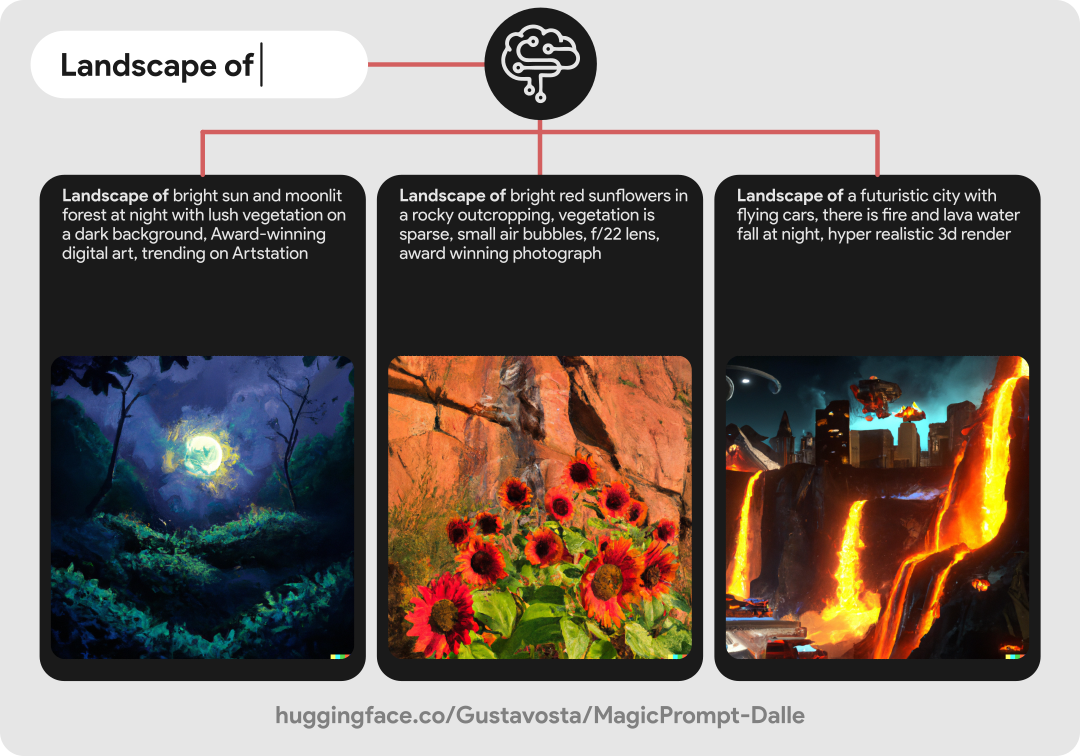
This is a model from the MagicPrompt series of models, which are GPT-2 models intended to generate prompt texts for imaging AIs, in this case: Dall-E 2.
πΌοΈ Here's an example:
This model was trained with a set of about 26k of data filtered and extracted from various places such as: The Web Archive, The SubReddit for Dall-E 2 and dalle2.gallery. This may be a relatively small dataset, but we have to consider that Dall-E 2 is a closed service and we only have prompts from people who share it and have access to the service, for now. The set was trained with about 40,000 steps and I have plans to improve the model if possible.
If you want to test the model with a demo, you can go to: "spaces/Gustavosta/MagicPrompt-Dalle".
π» You can see other MagicPrompt models:
- For Stable Diffusion: Gustavosta/MagicPrompt-Stable-Diffusion
- For Midjourney: Gustavosta/MagicPrompt-Midjourney [β οΈ In progress]
- MagicPrompt full: Gustavosta/MagicPrompt [β οΈ In progress]
βοΈ Licence:
When using this model, please credit: Gustavosta
Thanks for reading this far! :)
- Downloads last month
- 1,692
Install from pip and serve model
# Install vLLM from pip: pip install vllm# Start the vLLM server: vllm serve "Gustavosta/MagicPrompt-Dalle"# Call the server using curl (OpenAI-compatible API): curl -X POST "http://localhost:8000/v1/completions" \ -H "Content-Type: application/json" \ --data '{ "model": "Gustavosta/MagicPrompt-Dalle", "prompt": "Once upon a time,", "max_tokens": 512, "temperature": 0.5 }'