

title stringlengths 5 75 | url stringlengths 63 130 | date timestamp[s] | contents stringlengths 117 23.5k |
|---|---|---|---|
Organization notifications default list | https://support.expel.io/hc/en-us/articles/10012579141523-Organization-notifications-default-list | 2022-09-30T20:48:39 | These organization notifications are provided by default:
1. When an incident is created.
2. When an incident is assigned to my org.
3. When an investigation is assigned to my org.
4. When a remediation action is assigned to my org.
5. When a verify action is assigned to my org.
6. When an investigati... |
GitLab (SaaS) Setup for Workbench | https://support.expel.io/hc/en-us/articles/10853659813395-GitLab-SaaS-Setup-for-Workbench | 2022-10-31T17:50:22 | This article explains how to connect GitLab to Expel Workbench.
#### In this article
* Before you start
* Step 1: Enable console access
* Step 2: Configure the technology in Workbench
## Before you start
You must have:
* A GitLab SaaS installation. Reach out to your engagement manager if you’re using t... |
Check Point via SIEM setup for Workbench | https://support.expel.io/hc/en-us/articles/11455980950035-Check-Point-via-SIEM-setup-for-Workbench | 2022-11-21T21:23:01 | This procedure helps you to connect your Check Point via SIEM to the Expel
Workbench. The procedure is to port in logs by creating a new Syslog source,
configuring that source in Workbench, then your Check Point via SIEM device in
Workbench.
### Note
Some steps in this procedure vary greatly depending upon the SIEM-... |
Cisco FirePower via SIEM setup for Workbench | https://support.expel.io/hc/en-us/articles/11455981103379-Cisco-FirePower-via-SIEM-setup-for-Workbench | 2022-11-21T21:23:03 | This procedure helps you to connect your Cisco FirePower via SIEM to the Expel
Workbench. The procedure is to port in logs by creating a new Syslog source,
configuring that source in Workbench, then configure your Cisco FirePower via
SIEM device in Workbench.
### Note
Some steps in this procedure vary greatly depend... |
Cisco Meraki via SIEM setup for Workbench | https://support.expel.io/hc/en-us/articles/11455981226003-Cisco-Meraki-via-SIEM-setup-for-Workbench | 2022-11-21T21:23:04 | This procedure helps you to connect your Cisco Meraki via SIEM to the Expel
Workbench. The procedure is to port in logs by creating a new Syslog source,
configuring that source in Workbench, then configure your Cisco Meraki via
SIEM device in Workbench.
### Note
Some steps in this procedure vary greatly depending up... |
CyberArk via SIEM setup for Workbench | https://support.expel.io/hc/en-us/articles/11455981281299-CyberArk-via-SIEM-setup-for-Workbench | 2022-11-21T21:23:05 | This procedure helps you to connect your CyberArk via SIEM to the Expel
Workbench. The procedure is to port in logs by creating a new Syslog source,
configuring that source in Workbench, then configure your CyberArk via SIEM
device in Workbench.
### Note
Some steps in this procedure vary greatly depending upon the S... |
Palo Alto Networks via SIEM setup for Workbench | https://support.expel.io/hc/en-us/articles/11455981555603-Palo-Alto-Networks-via-SIEM-setup-for-Workbench | 2022-11-21T21:23:08 | This article helps you to connect your Palo Alto Networks via SIEM to the
Expel Workbench. The procedure is to port in logs by creating a new Syslog
source, configuring that source in Workbench, then configure your Palo Alto
Networks via SIEM device in Workbench.
### Note
Some steps in this procedure vary greatly de... |
Cisco ASA via SIEM setup for Workbench | https://support.expel.io/hc/en-us/articles/11455992258323-Cisco-ASA-via-SIEM-setup-for-Workbench | 2022-11-21T21:23:02 | This procedure helps you to connect your Cisco ASA via SIEM to the Expel
Workbench. The procedure is to port in logs by creating a new Syslog source,
configuring that source in Workbench, then your Cisco ASA through SIEM device
in Workbench.
### Note
Some steps in this procedure vary greatly depending upon the SIEM-... |
CylancePROTECT via SIEM setup for Workbench | https://support.expel.io/hc/en-us/articles/11455992575379-CylancePROTECT-via-SIEM-setup-for-Workbench | 2022-11-21T21:23:06 | This procedure helps you to connect your CylancePROTECT via SIEM to the Expel
Workbench. The procedure is to port in logs by creating a new Syslog source,
configuring that source in Workbench, then configure your CylancePROTECT
device in Workbench.
### Note
Some steps in this procedure vary greatly depending upon th... |
Forcepoint via SIEM setup for Workbench | https://support.expel.io/hc/en-us/articles/11455992644371-Forcepoint-via-SIEM-setup-for-Workbench | 2022-11-21T21:23:07 | This article helps you to connect your Forcepoint via SIEM to the Expel
Workbench. The procedure is to port in logs by creating a new Syslog source,
configuring that source in Workbench, then configure your Forcepoint via SIEM
device in Workbench.
### Note
Some steps in this procedure vary greatly depending upon the... |
Proofpoint via SIEM setup for Workbench | https://support.expel.io/hc/en-us/articles/11455992832403-Proofpoint-via-SIEM-setup-for-Workbench | 2022-11-21T21:23:08 | This article helps you to connect your Proofpoint via SIEM to the Expel
Workbench. The procedure is to port in logs by creating a new Syslog source,
configuring that source in Workbench, then configure your Proofpoint via SIEM
device in Workbench.
### Note
Some steps in this procedure vary greatly depending upon the... |
Symantec Endpoint Protection via SIEM setup for Workbench | https://support.expel.io/hc/en-us/articles/11455992924563-Symantec-Endpoint-Protection-via-SIEM-setup-for-Workbench | 2022-11-21T21:23:09 | This procedure helps you to connect your Symantec Endpoint Protection via SIEM
to the Expel Workbench. The procedure is to port in logs by creating a new
Syslog source, configuring that source in Workbench, then configure your
Symantec Endpoint Protection via SIEM device in Workbench.
### Note
Some steps in this pro... |
Google Kubernetes Engine (GKE) setup for Workbench | https://support.expel.io/hc/en-us/articles/11742313688595-Google-Kubernetes-Engine-GKE-setup-for-Workbench | 2022-12-01T15:04:58 | The Expel Google Kubernetes Engine (GKE) offering consumes audit logs from the
GCP platform through a log sink and pub/sub. This visibility allows Workbench
to identify activity of interest in GKE, investigate, and notify organizations
if action is recommended.
 setup for Workbench | https://support.expel.io/hc/en-us/articles/11742327047827-Amazon-Elastic-Kubernetes-Service-EKS-setup-for-Workbench | 2022-12-01T15:04:57 | The Expel Amazon Elastic Kubernetes Service (EKS) consumes audit logs from the
AWS platform through Kinesis. This visibility allows Workbench to identify
activity of interest in EKS, investigate, and notify organizations if action
is recommended.
 to uncover more inf... |
What are vendor alerts? | https://support.expel.io/hc/en-us/articles/12925743290387-What-are-vendor-alerts- | 2023-01-10T21:54:29 | Vendor alerts are the Expel-normalized representation of signal coming from
integrations you connected to Workbench. Vendor alerts are signal in the form
of alerts from security technologies such as endpoint detection and response
(EDR) providers, next-gen firewalls (NGFW), or security information and event
management ... |
What are findings? | https://support.expel.io/hc/en-us/articles/12925746962195-What-are-findings- | 2023-01-10T21:54:25 | Findings are where security analysts document, in detail, the answers to
questions such as: What is it? Where is it? When did it get here? How did it
get here?
### Tip
In the cases of commodity malware, business email compromise and red team
activity, the findings are even more optimized to directly address those
spe... |
What are investigative actions? | https://support.expel.io/hc/en-us/articles/12925747081875-What-are-investigative-actions- | 2023-01-10T21:54:27 | Investigative actions are steps an analyst and/or automation take to aid in
the investigation. Most commonly used investigative actions are steps that a
given security technology supports. For example,
* acquiring a file can be accomplished by asking Workbench to retrieve it.
* Workbench navigates for the SOC ana... |
What is a Phishing submission? | https://support.expel.io/hc/en-us/articles/12925747142803-What-is-a-Phishing-submission- | 2023-01-10T21:54:27 | The phishing submission model object represents some email metadata related to
an Expel alert. It can further link to other metadata in the form of
attachments/URLs/headers for that submission record. It's roughly analogous to
a vendor alert, but can also exist in tandem with a vendor alert. For example,
a Proofpoint T... |
What are remediation actions? | https://support.expel.io/hc/en-us/articles/12925747196051-What-are-remediation-actions- | 2023-01-10T21:54:28 | A remediation action is a recommended action that should be performed by the
customer organization, an analyst, or another automated process to ensure that
the bad actor(s) involved in an incident are stopped. Expel can automate some
remediation steps, removing the customer from the loop if they choose.
|
Expel alert categorization by alert fidelity and impact | https://support.expel.io/hc/en-us/articles/13017623221779-Expel-alert-categorization-by-alert-fidelity-and-impact | 2023-01-13T17:15:27 | Expel uses the following matrix to map an alert's fidelity and impact to an
Expel alert severity.
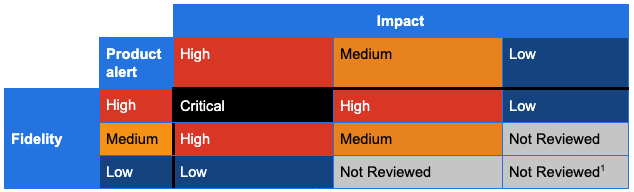
Expel considers the following when assigning severities of Critical, High,
Medium... |
Expel alert severity descriptions | https://support.expel.io/hc/en-us/articles/13017623282195-Expel-alert-severity-descriptions | 2023-01-13T17:15:28 | Expel processes 2 types of data from security technologies we integrate with:
alerts and events. Alerts are security events generated by a security
technology based on events it observed. Events are atomic elements like log
messages. Expel uses 2 combined approaches for mapping alerts to our alert
severity of Critical,... |
SIEM products fidelity and impact | https://support.expel.io/hc/en-us/articles/13017623557267-SIEM-products-fidelity-and-impact | 2023-01-13T17:15:31 | |
**Expel severity**
---|---
**Product**
|
**Critical**
|
**High**
|
**Medium**
|
**Low**
|
**Not reviewed**
Azure Log Analytics
| |
See Azure Active Directory Identity Protection and Microsoft Defender for
Cloud (formerly Azure Security Cloud)
|
See Azure Active Directory Identity Protec... |
Cloud products fidelity and impact | https://support.expel.io/hc/en-us/articles/13017668722707-Cloud-products-fidelity-and-impact | 2023-01-13T17:15:31 | |
**Expel severity**
---|---
**Product**
|
**Critical**
|
**High**
|
**Medium**
|
**Low**
|
**Not reviewed**
AWS GuardDuty
| | |
Severity 7 or greater
| |
Severity less than 7
AWS Inspector
| | |
High risk “Network Reachability” alerts
| |
All other alerts
AWS MACIE
| ... |
Usage Metrics overview | https://support.expel.io/hc/en-us/articles/13511503596179-Usage-Metrics-overview | 2023-01-30T17:25:04 | When your organization purchased Workbench, a certain number of attack
surfaces, or endpoints, were purchased. These endpoints are all the devices,
users, and other places threats can come from in your environment. In
Workbench you can see how many endpoints you're actually using in your
environment.
#### In this art... |
What's counted in your Expel usage | https://support.expel.io/hc/en-us/articles/13511503709587-What-s-counted-in-your-Expel-usage | 2023-01-30T17:25:05 | As you view your usage in Workbench, you see specific information for each
area. This article details that information for each type of technology.
#### In this article
* Kubernetes
* SaaS apps
* Duo
* Google Workspace
* Microsoft 365
* Okta
* Onelogin
* Cloud infrastructure
* A... |
Connecting your devices securely to Workbench | https://support.expel.io/hc/en-us/articles/13612714001171-Connecting-your-devices-securely-to-Workbench | 2023-02-02T15:59:46 | All traffic from Expel to your security devices come from 1 of these 6 IP
addresses, which are available in DNS under the hostname
egress.opsv2.expel.io. If your security tech supports an IP allow list,
configure it to restrict access to these IP addresses.
* 34.75.13.114
* 34.75.152.7
* 35.243.190.98
* 104... |
Slack setup for Workbench | https://support.expel.io/hc/en-us/articles/13807470251027-Slack-setup-for-Workbench | 2023-02-08T21:52:49 | This article helps you integrate your Slack installation with the Expel
Workbench.
#### In this article
* Before you start
* Step 1: Enable API access
* Step 2: Configure Slack in Expel Workbench
## Before you start
* **Slack Enterprise Grid is required.**
* The Slack app must be installed by the **O... |
Microsoft Intune setup for Workbench | https://support.expel.io/hc/en-us/articles/14012946928659-Microsoft-Intune-setup-for-Workbench | 2023-02-15T18:34:05 | This article helps you provide the provisioning of the Azure App needed to
perform the graph API queries for the deviceManagement endpoint, which allows
the Expel Workbench to collect logs for Microsoft Intune.
#### In this article
* Step 1: Enable console access
* Step 2: Configure Slack in Expel Workbench
##... |
ExtraHop Setup for Workbench | https://support.expel.io/hc/en-us/articles/14012947037715-ExtraHop-Setup-for-Workbench | 2023-02-15T18:34:06 | This guide helps you connect your ExtraHop installation to the Expel
Workbench.
#### In this article
* Before you start
* Step 1: Enable console access
* Step 2: Configure the technology in Workbench
## Before you start
You must have:
* **ExtraHop Reveal(x) Enterprise. Expel does not support ExtraHop R... |
GitHub self-hosted (on-prem) setup for Workbench | https://support.expel.io/hc/en-us/articles/14049611141779-GitHub-self-hosted-on-prem-setup-for-Workbench | 2023-02-16T18:36:02 | This article explains how to connect GitHub to Workbench.
#### In this article
* Before you start
* Step 1: Install the self-hosted GitHub App
* Step 2: Configure the technology in Workbench
## Before you start
You must have:
* A GitHub Enterprise account license. For more information, see GitHub produ... |
How to provision Expel Assembler | https://support.expel.io/hc/en-us/articles/1500002718861-How-to-provision-Expel-Assembler | 2021-02-17T20:44:46 | The Expel Assembler enables you to create a secure VPN connection so that we
can access your security devices. We’ve packaged it as a virtual machine. If
you install virtual machine images regularly, this should be pretty
straightforward.
#### In this article
* Do you need an Assembler?
* Download the Assembler... |
Lacework setup for Workbench | https://support.expel.io/hc/en-us/articles/1500002718881-Lacework-setup-for-Workbench | 2021-02-17T20:44:47 | This article explains how to connect Lacework to Workbench.
#### In this article
* Step 1: Enable console access
* Step 2: Generate API credentials
* Step 3: Configure the technology in Workbench
* Step 4: Edit the device to add console access
## Step 1: Enable console access
Create a user in Lacework ... |
Configuring your Okta SSO provider with Workbench | https://support.expel.io/hc/en-us/articles/1500002718901-Configuring-your-Okta-SSO-provider-with-Workbench | 2021-02-17T20:44:47 | This article explains setting up your Okta SSO provider with Expel Workbench
### Tip
Workbench logins don't support SCIM. We only support SAML and local logins.
1. Log into your Okta console.
2. Navigate to Applications in the main top navigation.
3. Click Add Application > Create New App.
4. The settings... |
Exabeam Fusion XDR setup for Workbench | https://support.expel.io/hc/en-us/articles/1500002718921-Exabeam-Fusion-XDR-setup-for-Workbench | 2021-02-17T20:44:50 | This article explains how to connect Exabeam Fusion XDR to Workbench.
#### In this article
* Step 1: Enable console access
* Step 2: Generate API credentials
* Step 3: Configure the technology in Workbench
* Step 4: Edit the device to add console access
## Step 1: Enable console access
Having read-only... |
VMware Carbon Black EDR setup for Workbench | https://support.expel.io/hc/en-us/articles/1500002718961-VMware-Carbon-Black-EDR-setup-for-Workbench | 2021-02-17T20:44:52 | This article explains how to connect VMware Carbon Black EDR to Workbench.
VMWare VMware Carbon Black EDR was formerly called Carbon Black Response.
#### In this article
* Step 1: Enable console access
* Create an admin account
* Verify VMware Carbon Black Live EDR is enabled
* Step 2: Generate API c... |
Attivo through SIEM setup for Workbench | https://support.expel.io/hc/en-us/articles/1500002719001-Attivo-through-SIEM-setup-for-Workbench | 2021-02-17T20:44:59 | This article explains how to connect Attivo to Workbench.
#### In this article
* Step 1: Enable console access
* Step 2: Logging Attivo using Sumo Logic and Splunk
* Step 3: Configure Attivo in Workbench
* Step 4: Edit the device to add console access
## Step 1: Enable console access
Having read-only a... |
Getting connected to Expel Workbench | https://support.expel.io/hc/en-us/articles/1500002872602-Getting-connected-to-Expel-Workbench | 2021-02-17T20:44:43 | Welcome to Expel. We’re excited to be working with you! We’ve put a lot of
effort into making it as easy as possible to get going. You have 3 basic steps
and this article walks you through each of them.
* Step 1: Get your account set up in Expel Workbench.
* Step 2: Complete configuration steps on your technologi... |
Trellix HX Series setup for Workbench | https://support.expel.io/hc/en-us/articles/1500002872642-Trellix-HX-Series-setup-for-Workbench | 2021-02-17T20:44:46 | This article explains how to connect Trellix HX to Workbench.
#### In this article
* Step 1: Enable console access
* Step 2: Generate API credentials
* Step 3: Configure the technology in Workbench
* Step 4: Edit the device to add console access
## Step 1: Enable console access
This procedure creates a... |
Okta setup for Workbench | https://support.expel.io/hc/en-us/articles/1500002872662-Okta-setup-for-Workbench | 2021-02-17T20:44:46 | This article explains how to connect Okta to Workbench.
#### In this article
* Step 1: Enable console access
* Step 2: Generate API credentials
* Step 3: Configure the technology in Workbench
## Step 1: Enable console access
Having read-only access to the interface of your technology allows Expel to
dig d... |
Configuring your OneLogin SSO provider with Workbench | https://support.expel.io/hc/en-us/articles/1500002872682-Configuring-your-OneLogin-SSO-provider-with-Workbench | 2021-02-17T20:44:48 | This article explains setting up your OneLogin SSO provider with Expel
Workbench
### Tip
Workbench logins don't support SCIM. We only support SAML and local logins.
1. Log into your OneLogin Console and navigate to Administration in the top right corner.
2. Navigate to Applications > Add App.
3. Search for S... |
Splunk setup for Workbench | https://support.expel.io/hc/en-us/articles/1500002872702-Splunk-setup-for-Workbench | 2021-02-17T20:44:48 | By following these steps, you create a user account for Expel that keeps the
Expel activity separate from other activity on the Splunk console.
### Note
Expel needs access to the Splunk device or instance through port 8000 (UI) and
8089 (API). For cloud instances, follow the Splunk Configure IP Allow List
instruction... |
Elastic Endpoint Security (formerly Endgame) setup for Workbench | https://support.expel.io/hc/en-us/articles/1500002872722-Elastic-Endpoint-Security-formerly-Endgame-setup-for-Workbench | 2021-02-17T20:44:50 | This article explains how to connect Elastic Endpoint Security to Workbench.
#### In this article
* Step 1: Enable console access
* Step 2: Configure the technology in Workbench
* Step 3: Edit the device to add console access
## Step 1: Enable console access
Having read-only access to the interface of you... |
Darktrace direct setup for Workbench | https://support.expel.io/hc/en-us/articles/1500002872742-Darktrace-direct-setup-for-Workbench | 2021-02-17T20:44:51 | Darktrace is an Intrusion Detection Device (IDS) that leverages machine
learning to detect emerging threats, including insider threats, low-and-slow
attacks, and automated viruses.
#### In this article
* Step 1: Enable console access
* Step 2: Generate API credentials
* Step 3: Configure the technology in Wo... |
End of preview. Expand in Data Studio
- Downloads last month
- 34