|
|
--- |
|
|
license: apache-2.0 |
|
|
language: |
|
|
- en |
|
|
base_model: |
|
|
- Comfy-Org/z_image_turbo |
|
|
widget: |
|
|
- text: >- |
|
|
cute anime style girl with massive fluffy fennec ears and a big fluffy tail blonde messy long hair blue eyes wearing a maid outfit with a long black gold leaf pattern dress and a white apron, it is a postcard held by a hand in front of a beautiful realistic city at sunset and there is cursive writing that says "ZImage, Now in GGUF"" |
|
|
output: |
|
|
url: workflow-demo-03.png |
|
|
- text: >- |
|
|
cute anime style girl with massive fluffy fennec ears and a big fluffy tail blonde messy long hair blue eyes wearing a maid outfit with a long black gold leaf pattern dress and a white apron, it is a postcard held by a hand in front of a beautiful realistic city at sunset and there is cursive writing that says "ZImage, Now in GGUF"" |
|
|
output: |
|
|
url: workflow-demo-02.png |
|
|
- text: >- |
|
|
cute anime style girl with massive fluffy fennec ears and a big fluffy tail blonde messy long hair blue eyes wearing a maid outfit with a long black gold leaf pattern dress and a white apron, it is a postcard held by a hand in front of a beautiful realistic city at sunset and there is cursive writing that says "ZImage, Now in GGUF"" |
|
|
output: |
|
|
url: workflow-demo-01.png |
|
|
--- |
|
|
## z-image-gguf |
|
|
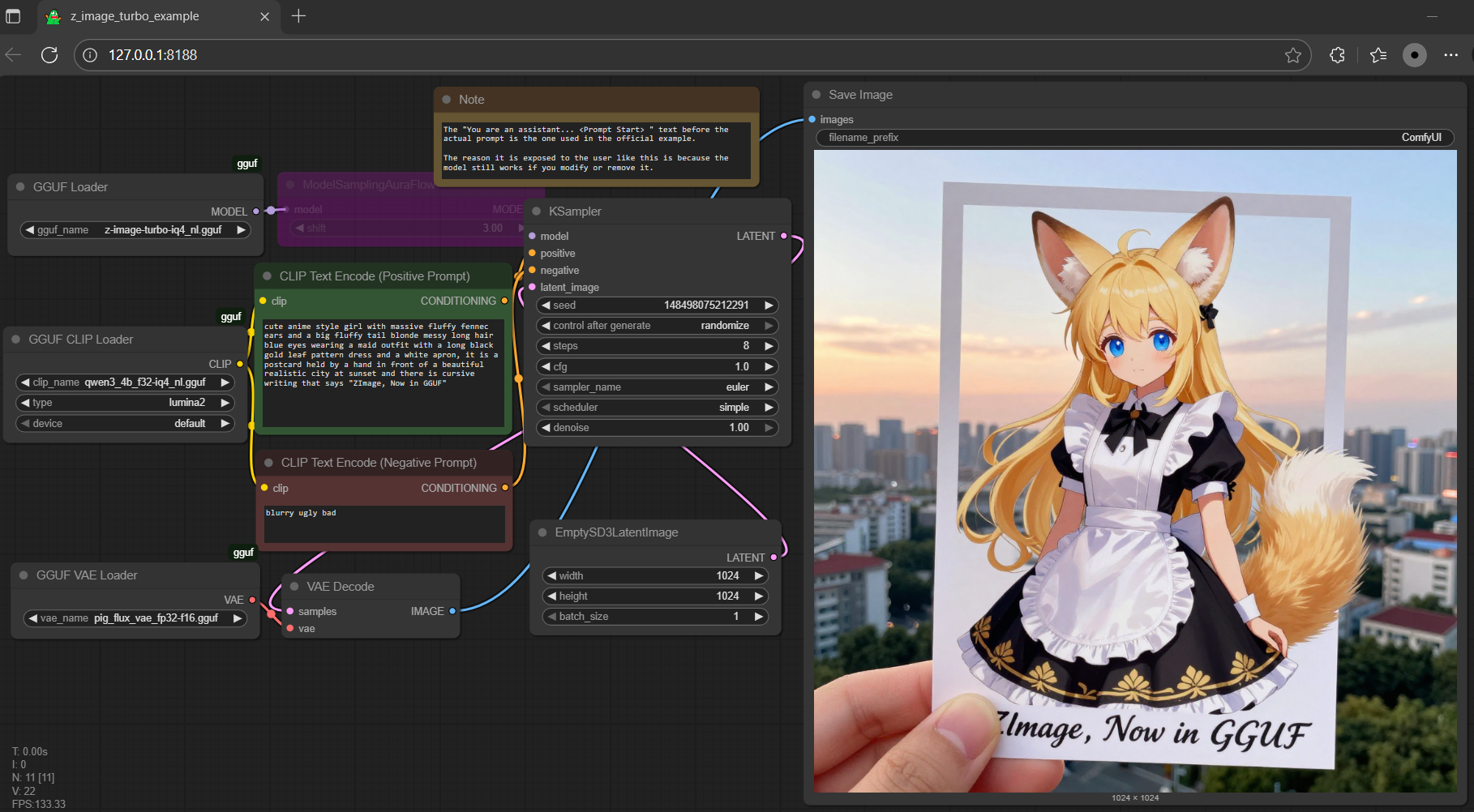
- drag **pig** to > `./ComfyUI/models/vae` |
|
|
- drag **qwen3-4b** to > `./ComfyUI/models/text_encoders` |
|
|
- compatible with [this](https://huggingface.co/Qwen/Qwen3-VL-4B-Thinking-GGUF/tree/main), [this](https://huggingface.co/Qwen/Qwen3-VL-4B-Instruct-GGUF/tree/main), [this](https://huggingface.co/unsloth/Qwen3-4B-GGUF/tree/main), [this](https://huggingface.co/bartowski/Qwen_Qwen3-4B-Instruct-2507-GGUF/tree/main), etc. (but 🐷 reversible, opt anyone you like) |
|
|
- drag **z-image** to > `./ComfyUI/models/diffusion_models` |
|
|
|
|
|
 |
|
|
|
|
|
<Gallery /> |
|
|
|
|
|
## z1 |
|
|
- run it with `gguf-connector`; simply execute the command below in console/terminal |
|
|
``` |
|
|
ggc z1 |
|
|
``` |
|
|
> |
|
|
>GGUF file(s) available. Select which one to use: |
|
|
> |
|
|
>1. z-image-turbo-q3_k_s.gguf |
|
|
>2. z-image-turbo-iq4_nl.gguf |
|
|
>3. z-image-turbo-iq4_xs.gguf |
|
|
> |
|
|
>Enter your choice (1 to 3): _ |
|
|
> |
|
|
- opt a `gguf` file in your current directory to interact with; nothing else |